
Ask about your team in plain words
The assistant sees your workspace's current metrics for the month and answers questions about calls, reps, stages and objections.
CLUE for teams
The team dashboard, the call log, a full breakdown of a conversation, rep profiles, an assistant, and analysis tuned to your sales process.
Free: 5 calls a month, $0, no card.
01 · Dashboard
Volume, quality, the split of calls, objections, stages, and who is delivering the result. The period switches between 7, 30 and 90 days.
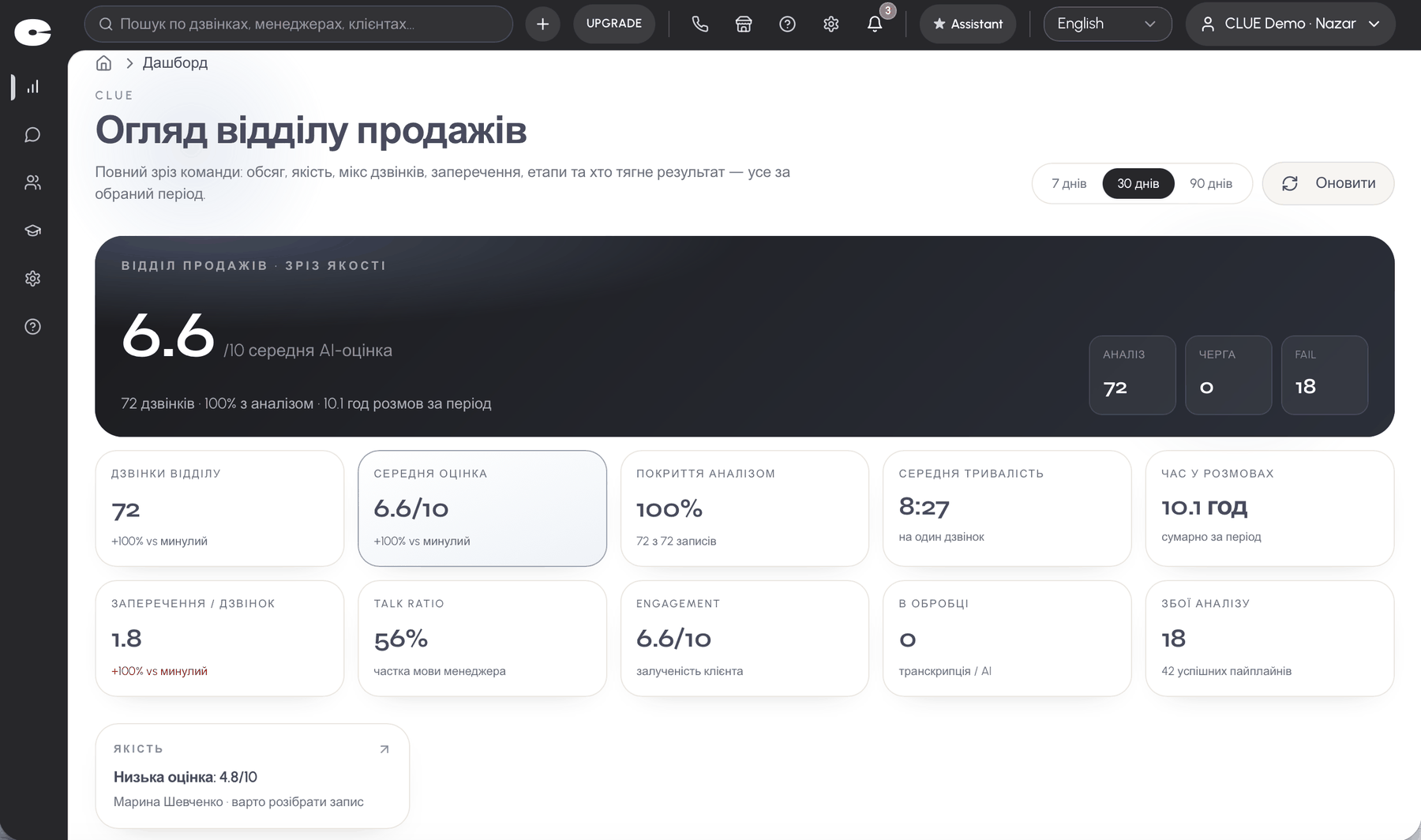
Team call volume against the previous period, average score, analysis coverage and average duration.
Time spent talking, objections per call, talk ratio, customer engagement, how many recordings are in processing and how many failed during the period.
Call and score trends, sentiment distribution, score distribution, top keywords, top objections, sales stages, the rep ranking, and recent calls.
02 · Call log
Filters by date, rep, score, stage, call type, tone, objection and duration. Favourite filter sets are saved.
One query like “every call scoring under 5 where the customer raised price” replaces an evening of manual listening.
03 · Call breakdown
An audio player with the transcript in sync, the rep and the customer split apart, timecodes, and the current segment highlighted as it plays.
From 1 to 10, with a clear indicator and an open formula: you can see what each stage added or took away.
Talk ratio, pauses, how many questions each side asked, time spent on price, interruptions, and the next steps captured.
The type of objection, the minute it appeared, and what the rep said back. You see the reaction, not just the fact.
Opening, discovery, presentation, objection handling, closing. Each stage scored on its own. That is the default schema: on Pro you set the stage names and weights.
What the rep did well and what to change next time. The wording is specific and tied to actual lines.
A CSV with the key metrics for one call or a whole selection, ready to drop into a report.
One call as an example. The two weakest stages are highlighted: those are the ones worth raising at the next one-to-one.
04 · Reps
The ranking is built on real calls: average score, movement over time, conversion, duration, conversation quality.
A signal appears when a pattern repeats, not after one bad call.
The assistant sees your workspace's current metrics for the month and answers questions about calls, reps, stages and objections.
On Pro you set your own stage names and their weights on top of the standard schema, plus the keywords the system watches for risk. On Enterprise the analysis goes deeper: your own quality and objection criteria, and your own scoring scenario.
05 · Roles and access
A rep never sees anyone else's calls. The lead sees the team. Only rep and coach seats are billed.
| Role | Access |
|---|---|
| Owner and admin | the whole company · free |
| Sales rep | their own calls · paid seat |
| Coach | coaching analytics · paid seat |
| Analyst | data and export |
Get started
5 calls a month, $0, no card.